Filter webhook job events by queue
Webhooks can now send job events for only the queues you choose. If your autoscaler, dashboard, or alerting only cares about one queue, it no longer has to receive every job event in your organization and throw most of them away. For example, a GPU autoscaler can now receive job.scheduled events only for jobs on your gpu queue.
When you add or edit a webhook in Notification Services, choose queues in the new Queues section, below Events. Each cluster has its own searchable dropdown. Once you select queues, the webhook sends job.scheduled, job.started, job.finished, job.activated, and job.promised_exit_status events only for jobs on those queues.
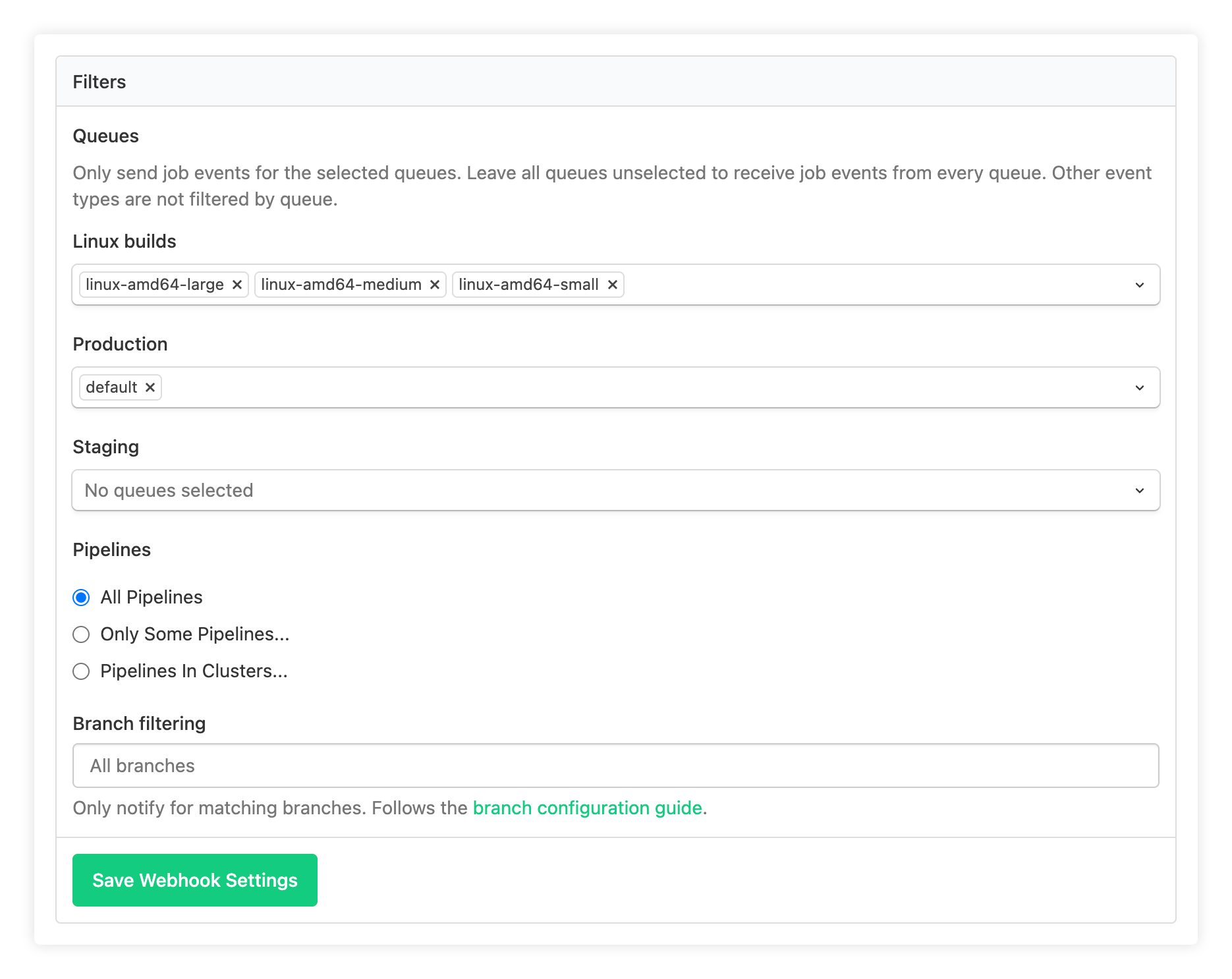
The queue filter applies on top of the webhook's existing Pipelines and Branch filtering settings. Build, agent, ping, and other events that aren't job events still arrive as before. If you leave every dropdown empty, the webhook sends job events for all queues, as it did before.
In the REST API, set the queue IDs in the webhook's cluster_queue_ids setting through the notification services API.
Narrow an existing webhook down to the queues its consumer actually uses, and see the webhooks documentation for the full list of job events.
Al
You deserve better CI.
Get started for free with a full month of our all-access trial.